

I Compared 7 AI Coding Tools So You Don't Have To
Spent way too much time testing Cursor, GitHub Copilot, ChatGPT, and others. Here's what actually matters when picking an AI coding assistant.
I've been using AI coding tools for a while now, and the landscape has gotten crowded. Like, really crowded. Everyone's launching an AI code editor or plugin, and they all claim to be the best.
So I did what any normal person would do. I spent an embarrassing amount of time testing them all and put together a comparison table. Not because I'm some masochist, but because I was genuinely curious which one would be worth paying for.
What I Actually Tested
I looked at seven tools. Cursor, GitHub Copilot, ChatGPT Plus (you can code with it now, apparently), Windsurf, Cody, Supermaven, and Continue. Some are standalone editors. Some are VS Code plugins. Some are just chatbots that happen to write code.
The goal wasn't to crown a winner. It was to figure out what each tool is actually good at and who should use it.
The Thing Everyone Gets Wrong
Most comparisons focus on features. Can it autocomplete? Does it have chat? How many models does it support?
That stuff matters, but what really matters is limits. Because every single one of these tools has some kind of ceiling where it either slows you down, cuts you off, or charges you more.
GitHub Copilot has a hard cap on completions per month. Cursor has both soft and hard limits depending on what model you're using. ChatGPT doesn't have coding specific limits, but good luck actually building something in a chat interface.
The question isn't "which tool has the most features?" It's "which tool will let me work the way I want without hitting a wall?"
What I Found
Free tiers are all over the place. Continue is genuinely unlimited if you bring your own API key, which is wild. Cody gives you real credits that actually go pretty far. Cursor's free tier exists but you'll burn through it fast if you're doing anything serious.
For paid plans, Cursor at $20/month is expensive but you get access to the best models and higher limits. GitHub Copilot at $10/month is cheaper but you're stuck with their limits and you can't switch models. ChatGPT Plus at $20/month is fine if you just want to brainstorm code or debug stuff, but it's not really a coding environment.
Windsurf is interesting. It's new, it's trying to do what Cursor does, and it's cheaper. But it's also rougher around the edges. If you like being on the bleeding edge, check it out. If you want something stable, maybe wait.
The Actual Comparison
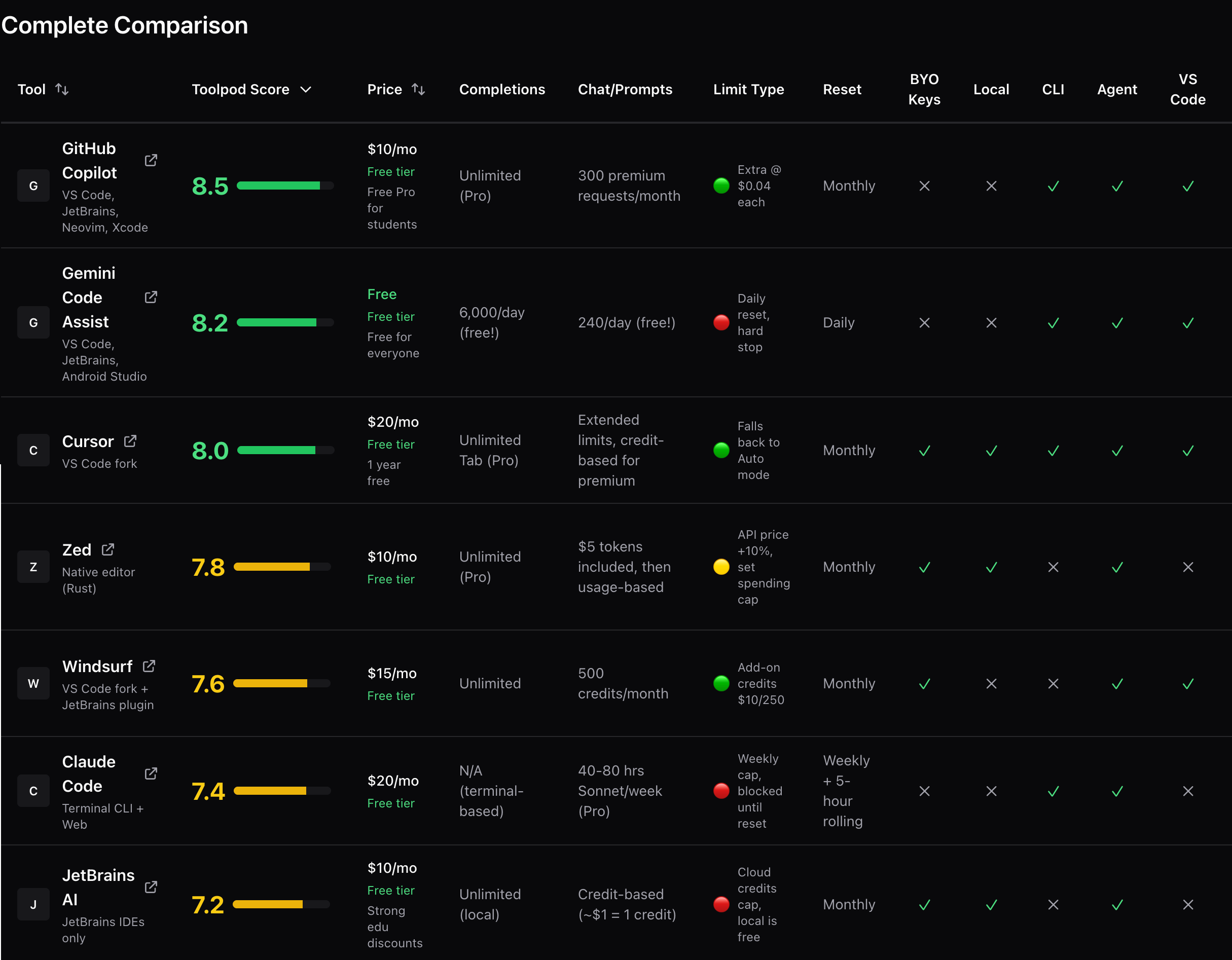
I built a full breakdown table on Toolpod. It has everything. Pricing, model support, limit types (soft vs hard vs usage based), IDE requirements, whether it works offline, all of it.
I also scored each tool on a 0 to 10 scale based on value, free tier quality, flexibility, limits, and features. The scoring isn't scientific, but it's honest. I used all of these tools. I know what's annoying about each one.
You can filter by price range (free only, under $15, etc.) or by model support (just show me tools with Claude or GPT-4). The whole thing is designed to help you figure out which tool fits your situation, not mine.
Who Should Use What
If you're a student or hobbyist, start with Continue or Cody. Both have generous free tiers. Continue is unlimited if you have an API key. Cody is easier to set up.
If you're a professional and you code all day, Cursor is probably worth it. The $20/month stings but the limits are high enough that you won't think about them. Plus you get access to Claude Sonnet and GPT-4, which are legitimately better than the older models.
If you're already paying for ChatGPT Plus and you just need occasional coding help, you're covered. Don't pay for another tool.
If you're using GitHub Copilot already and you're happy, there's no urgent reason to switch. It's solid. The limits are annoying but they're not deal breakers unless you're a really heavy user.
The Stuff Nobody Talks About
Limit types matter more than limit numbers. A soft limit means you get throttled but you can keep working. A hard limit means you're done until next month. A usage based limit means you pay more if you go over.
Most tools have soft limits on their premium models and hard limits on their basic ones. That's fine, but you need to know which is which before you commit.
Also, some tools let you bring your own API keys for certain models. This is huge if you already pay for API access elsewhere. Continue supports this natively. Cursor and Cody have workarounds but they're clunky.
My Take
I use Cursor. I've tried the others. I keep coming back to Cursor because it just works and I don't think about limits. That's worth $20 to me.
But that doesn't mean it's the best choice for you. If you're price sensitive, Cody is way better value. If you want total control, Continue is unmatched. If you're just starting out, GitHub Copilot's student plan is free and perfectly fine.
The comparison table breaks all this down in more detail. Go check it out, filter by what matters to you, and pick the tool that fits your workflow.
And if you try one and hate it, try another. Most of these have free trials or free tiers. There's no penalty for experimenting.
More Articles
How to Detect AI-Written Content in 2026
AI-generated content is everywhere. Here's how to spot it, why it matters, and what tools actually work for detecting text from ChatGPT, Claude, and other AI writers.
Building With AI Code Generators: What Actually Works
AI coding tools let non-developers build real software now. Here's what I've learned about making it actually work in production.
Why Every Developer Needs a JSON Formatter Bookmarked
JSON is everywhere in modern development. Here's why having a good formatter within reach saves time and prevents headaches.