

I Compared 18 AI Coding Tools So You Don't Have To
Spent way too much time testing Cursor, GitHub Copilot, Claude Code, Windsurf, and 14 others. Here's what actually matters when picking an AI coding assistant.
The AI coding tool space has gotten ridiculous. There are probably 50+ options now, each claiming to be the future of development. Some cost money. Some are free. Some work in your IDE. Some work in the terminal. And they all promise to make you 10x faster.
I got tired of wondering which one to use, so I tested 18 of them over a few months. Not just quick demos. Actually using them for real work. Here's what I learned.
The Tools I Tested
The list ended up being longer than I expected: Cursor, GitHub Copilot, Windsurf, Continue, Claude Code, Amazon Q, Cody, Tabnine, Supermaven, Zed AI, Replit, Aider, Cline, Lovable, Bolt, v0, Codeium, and OpenAI Codex.
Some are full IDEs with AI built in. Others are plugins for VS Code or JetBrains. A few are command-line tools. And a couple are web-based builders for people who don't code at all.
The variety is actually the interesting part. These aren't all trying to do the same thing. They're solving different problems for different workflows.
What Actually Matters
Features are easy to list. Every tool has autocomplete, chat, multiple models, blah blah. But that's not what determines if a tool works for you.
What matters is how the tool handles limits and context.
Limits determine if you can actually use the tool without constantly hitting walls. Some tools cut you off hard. Some slow you down. Some charge you more. Understanding the limit structure matters more than knowing the feature list.
Context determines if the tool understands your project or just sees isolated files. Full codebase awareness is powerful but risky. Limited context is safer but dumber. Both have tradeoffs.
Free vs Paid: The Real Story
The free tier quality varies wildly. Continue, Aider, and Cline are legitimately unlimited if you bring your own OpenAI or Anthropic API key. Codeium is completely free with no strings attached, which seems too good to be true but isn't.
Windsurf is free with BYOK. Cursor and Copilot both have free tiers but they're pretty limited.
On the paid side, prices cluster around $10-20/month. Copilot is $10 and does the job. Cursor is $20 and gives you more powerful models with higher limits. Claude Code, Amazon Q, Replit, and a bunch of others sit at $20.
The specialized tools have their own pricing. Lovable and Bolt are both $20 for app building without code. Tabnine charges more for enterprise features. v0 has usage-based pricing through Vercel.
The Cursor vs Claude Code Question
I use both, but for different things. Cursor is my main editor because it keeps context across the whole project better. When you're working on something with multiple files that all connect, Cursor understands how they fit together.
Claude Code has better reasoning for complex problems, but it can get tunnel vision. I've had it fix one thing perfectly while breaking something else because it hyperfocused on the immediate task and it ignored any dependencies. I basically wrote over good code with bad. Then when I went to fix that issue, it broke another. It was a constant game of Whac-O-Mole.
My workflow now: use Claude (the chat, not the IDE extension) to think through complex problems and write detailed plans. Then copy those plans into Cursor and let it execute. Claude plans, Cursor builds. Works better than using either one alone.
The other thing I learned: the models in Cursor behave differently than using Claude Code via CLI. Cursor feeds the models your entire file structure and open tabs automatically. In the CLI you have to explicitly tell it which files matter. Same model, different context, different results.
The Comparison Table
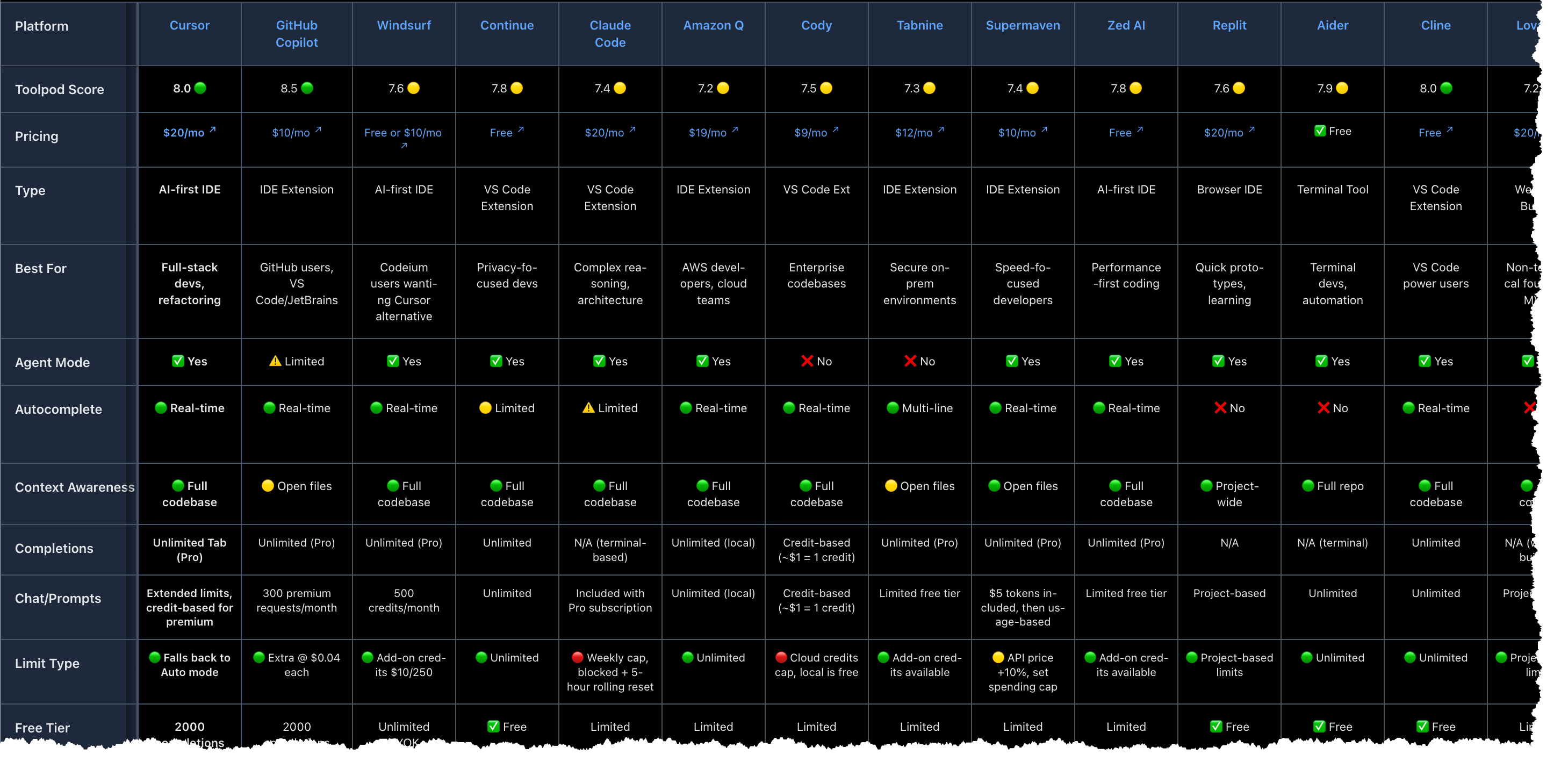
I built a full breakdown on Toolpod with all 18 tools scored on a 10-point scale. GitHub Copilot scored highest (8.5) because it's reliable and works everywhere. Codeium got 8.2 for being totally free. Cursor and Cline both hit 8.0.
The table has everything: pricing, what models each tool supports, how limits work (hard caps vs soft throttling vs usage-based), IDE compatibility, offline support, all of it. You can filter by price or by what matters to you.
The scoring isn't scientific but it's based on actually using these tools every day. I know what's annoying about each one because I've hit those pain points myself.
Recommendations By Use Case
Students and hobbyists: Codeium, Continue, or Cline. All free. Codeium is easiest to set up. Continue and Cline need API keys but then they're unlimited.
Professional developers: Cursor if you can afford $20/month. The limits are high enough that you won't think about them. GitHub Copilot if you want to save $10 and don't need the fanciest models.
Speed-focused devs: Supermaven or Zed AI. Both optimize for low latency over features.
AWS shops: Amazon Q has deep AWS integration and security scanning built in.
Quick prototyping: Replit for instant deployment. Lovable or Bolt if you're non-technical and just need to spin up a web app fast.
Terminal users: Aider is great for making changes across your whole repo from the command line.
The Hidden Issues
Some things you only learn by using these tools:
Cursor burns credits fast if you lean on agent mode. And sometimes it loses context mid-conversation, which means you have to start over or manually remind it what you're working on.
Claude Code can wreck parts of your project while fixing other parts. It gets so focused on solving the immediate problem that it forgets about side effects. You have to review everything.
Most tools have some version of "bring your own API keys" but the implementation varies. Continue, Cline, Windsurf, and Codeium make it easy. Others make it annoying or impossible.
Hard limits (you're cut off) are worse than soft limits (you're throttled). And both are worse than usage-based pricing if you're a heavy user. Know which type of limit you're dealing with before you commit to a tool.
Why Context Awareness Is Everything
The biggest dividing line between these tools: can they see your whole codebase or just the file you're editing?
Cursor, Windsurf, Continue, Claude Code, Cline, and a few others have full codebase awareness. They can make smart suggestions that account for how all your files connect. But they can also make bigger mistakes because they're reasoning about more stuff.
GitHub Copilot and some others only see your open files. They're safer because they can't accidentally break things in files you're not looking at. But they miss patterns and relationships that span multiple files.
Neither approach is better. It depends on what you're doing. Refactoring across multiple files? You want full codebase awareness. Making a quick fix to one function? Limited context is fine and probably safer.
What I Actually Use
Cursor for coding. Claude for planning. That's the combo that works for me. Cursor handles execution without losing track of the project. Claude thinks through the hard architectural decisions.
But my workflow isn't your workflow. If money's tight, Codeium or Cody deliver most of what Cursor does for free or way cheaper. If you want maximum control, Continue or Aider let you swap models and configure everything. If you're starting out, Copilot is the obvious safe choice.
The full comparison breaks down all 18 tools with scores, pricing, what they're good at, and what's annoying about them. Check it out and pick what fits your situation.
Most of these have free tiers or trials. Try a few. See what clicks. There's no penalty for experimenting, and you'll figure out pretty quick what works for how you code.
More Articles
OpenClaw: The Open-Source AI Agent That's Taking Over GitHub
OpenClaw went from a weekend hack to 329,000 GitHub stars in under four months. Here's what it actually is, how it works, and whether it's worth your time.
Stop Cursor From Breaking Your Working Code: The Tunnel Vision Problem
AI coding assistants like Cursor can fix one bug while introducing three more because they can't see your whole codebase. Here's how to prevent Claude from breaking working code when you're just trying to fix one thing.
How Claude Actually Remembers: Projects, Memory, and Context That Survives
Starting fresh conversations loses context, but endless chats degrade into garbage. Here's how to use Claude's Projects and memory features to maintain continuity without drowning in context bloat.